EZ File Upload for VS Code
A VS Code extension that eliminates the drag-and-drop hassle with a simple right-click file upload feature for local and remote workspaces
Tech Stack
1 The Challenge
The painful workflow of exiting full-screen mode on Mac, dragging files from Finder, then going back to full-screen just to upload files into VS Code workspace folders.
2 The Solution
Built a VS Code extension with intelligent context menu integration and Command Palette support that adapts seamlessly between local and remote environments, making file uploads as simple as right-click → upload.
EZ File Upload for VS Code
One of the most annoying things about using VS Code is when you need to upload files, you have to exit full-screen mode (on Mac), drag and drop files from Finder, then go back to full-screen. It's painful.
In 2026, I decided to end this suffering by building the EZ File Upload extension for VS Code. Just right-click on a folder → upload here, or Cmd+P → upload here. Simple as ABC. It even works with remote servers and GitHub Codespaces.
Goodbye Drag and Drop.
Key Features
Two Ways to Upload
- Context Menu: Right-click any folder in Explorer → "Upload Files Here..."
- Command Palette: Cmd+Shift+P / Ctrl+Shift+P → "Upload Files Here" with smart destination detection
Works Everywhere
Full compatibility with:
- Local Workspaces: Native OS file picker
- Remote Environments: GitHub Codespaces, SSH, WSL, Dev Containers
- Compatible Editors: VS Code, Cursor, and Antigravity
Smart Features
- Multi-file Selection: Upload multiple files simultaneously
- Conflict Management: Automatic prompts when files exist (Overwrite/Skip)
- Progress Tracking: Real-time notifications during uploads
- Cancellable Operations: Stop uploads in progress on local workspaces
- Smart Destination: Auto-detects active file's directory or workspace root
Development Process
The Problem
As a Mac user working in full-screen mode, the constant workflow interruption was frustrating:
- Exit full-screen (⌃⌘F)
- Switch to Finder
- Drag files into VS Code
- Go back to full-screen
This happens dozens of times per day, especially when working with assets, configs, or documentation files. The breaking point was realizing this same pain exists for remote development scenarios like GitHub Codespaces where drag-and-drop is even more unreliable.
Impact
The extension eliminates a frustrating daily friction point for VS Code users, particularly those who:
- Work in full-screen mode on macOS
- Use remote development environments frequently
- Need to upload multiple files regularly
- Value keyboard-first workflows
By providing both context menu and Command Palette access, it accommodates different working styles while maintaining a clean, unobtrusive UX.
Preview
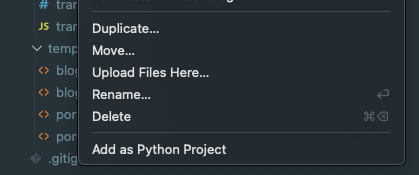
Right-click context menu integration for quick file uploads

Command Palette access for keyboard-first workflow
Download & Install
Install directly from VS Code Marketplace:
EZ File Upload Extension
Or search "EZ File Upload" in VS Code Extensions panel.
How to Use
Method 1: Context Menu
- Right-click on any folder in Explorer
- Select "Upload Files Here..."
- Choose files from your system
- Done!
Method 2: Command Palette
- Press Cmd+Shift+P (Mac) or Ctrl+Shift+P (Windows/Linux)
- Type "Upload Files Here"
- Select destination folder (if needed)
- Choose files
- Done!
Technologies Used
- TypeScript: Type-safe extension development
- VS Code Extension API: Context menu integration, file system operations, webview management
- HTML5 File API: Remote workspace file selection
- postMessage API: Secure webview-to-extension communication
- VS Code File System API: Cross-platform file operations
Future Enhancements
Potential features for future updates:
- Folder upload support (not just files)
- Drag-and-drop enhancement mode
- Custom upload location shortcuts
- File type filtering options
- Batch rename during upload
- Integration with cloud storage providers
- Upload history and quick re-upload